High profile migrations to Shopify have often gone awry. If the big guys get it so wrong, what chance do you have?
Shopify might be quick and easy to use, but any great SEO knows that the ability to handle the robots.txt file, duplicate content, and URL structure is severely limited.
At Shopblocks, we developed an ecommerce platform with technical SEO in mind. We worked as technical SEO specialists and listened to other experts, then created a platform that surpasses what 'cut-and-paste' or 'one-size-fits-all' offerings allow you.
With our roots in an SEO agency founded in 2005, we have prominent clients across the biggest brands in the UK and understand what the future of well-integrated SEO into ecommerce platforms needs.
Don't Touch Migrations to Shopify

Ever overseen a migration from Magento to Shopify? Or from any other platform to Shopify for that matter? When you're dealing with an already relatively successful ecommerce website, minimising traffic and sale losses on migration is, of course, imperative. So why does Shopify make it so damn hard?
Inflexible URL structure and setup means migrations generally require significant redirects. This means there is scope for things to go wrong. Depending on which platform you migrate from, data doesn’t always import properly. Manual intervention is required and on a large migration, this is impractical.
Let's look at https://www.pineapple.uk.com/ as an example. Using the Wayback machine, you can see their site moved over to Shopify between February 2020 and April 2020. In that period, their organic search visibility dropped significantly.
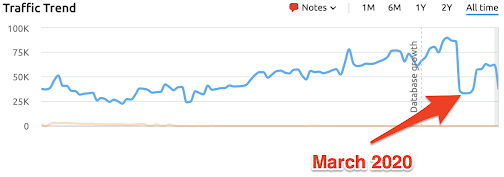
They’ve never recovered the visibility they had before migrating to Shopify.
Good technical SEOs know what they need in a migration – they know exactly what needs to happen to minimise the risk of their clients or employers losing sales and traffic. But too many ecommerce platforms restrict their ability to actually implement a smooth migration.
Work with a provider who understands your SEO needs so you are able to migrate your platform with as much flexibility and control as possible.
Duplicate Content Issues Are Rife In Shopify
A problem SEO specialists find with Shopify is that a product will be accessible at multiple URLs.
Let’s look at the Pineapple store as an example once again. This product is available at this link <https://www.pineapple.uk.com/collections/women-tops-hoodies-sweatshirts/products/womens-monster-white-longsleeve-sweatshirt-tl15560a2>.
The same product is also accessible here.
The content is identical, even though the links are different. This is because Shopify has created a /products URL for each product and a URL based on which collection it features in.
Duplicate content is a technical SEO’s worst nightmare. The last thing any SEO expert wants is for a search engine to send customers to the wrong place, or to decrease your search engine ranking.
Unfortunately many of Shopify’s duplicate content issues cannot be solved as the default link structures are baked-in, defaulting to non-canonical URLs.
It's essential for a platform to give you all the tools and options you require to avoid duplicate content issues and make it as accessible and simple as possible.
Internal Linking Nightmares!

Shopify forces the internal linking structure on you with no option to opt out. And this becomes a particular issue when we think back to that duplicate content issue we just talked about.
Shopify is getting around the duplicate content problem explained above by using canonical tags. So when you look at https://www.pineapple.uk.com/collections/women-tops-hoodies-sweatshirts/products/womens-monster-white-longsleeve-sweatshirt-tl15560a2 we see this canonical tag advising Google that the canonical (or primary) URL is the /products one:

But when you go to the collections page this product features in, you see all of the internal links to products point to the non-canonical page, sending some serious mixed signals to Google and, as a result, meaning lots of non-canonical pages on this site in particular (and many others) are indexed in Google.
When you’re using canonical tags to avoid Google perceiving a duplicate content issue on your site, your absolute basic level box ticking is to get the internal links matching up.
It’s fixable but means editing your theme’s liquid files. Not particularly straightforward, often requiring a developer and actually something that could easily be overlooked. Afterall, you would be forgiven for assuming it would be correct out of the box.
The reasons to seek out a flexible and bespoke platform versus a template platform are enormous. You have greater control of your site, and you, as the SEO expert can implement what you know is the right thing without having to compromise and work around the limitations of your platform.
How Dare They Lock the Robots.txt File?

Shopify will not let you edit the robots.txt file. Not at all. Not even with the option of clicking a big disclaimer button saying you know what you’re doing and want to edit it. We have found online requests that date as far back as 2011 asking Shopify to allow access to edit the robots.txt file.
But Shopify locks the file: <https://community.shopify.com/c/Shopify-Discussion/How-can-I-edit-robots-txt/td-p/432485>
In this link <https://help.shopify.com/en/manual/promoting-marketing/seo/hide-a-page-from-search-engines>, Shopify says to follow these steps to hide a page (but points out you can’t remove any pages from the robots.txt file).
Let’s be clear. In that URL, Shopify isn’t telling you how to add anything to the robots.txt file. What they're actually showing you how to do is put noindex tags on a page.
Big difference! Noindex tags will stop Google indexing a page generally, but not crawling it. Google still has to crawl the page to read the tag so it knows not to index. So if you’re trying to optimise your crawl budget on a large ecommerce store, for example, this is basically impossible.
It’s arrogant of Shopify to assume their setup is best and no SEO would ever need to improve upon it.
Picking a platform where you can not edit the robots.txt file should tell you you're in the wrong place. While the 'one-size-fits-all' cut-and-paste sites may seem easy to use and can be cheaper, they give you no scope for development.
Load Speed Is More Important Than Ever

Google updates in 2020 have further prioritised load speed. The fact is that faster websites will now rank higher on the search engine.
You need to make sure that the ecommerce platform you choose to work with is in tune with Google's algorithm changes.
You need to ensure you are working on a platform that can shift quickly and respond to Google's changes almost immediately rather than waiting for a template-based monolith to change their back end.
What's next? Where are things heading? Content and load speed – you need a platform that is geared up to what's coming.




 Powered by Maj.com